

AI is making the internet a worse place to be. Right now people use it to generate countless loud and obnoxious puppets that inundate every corner of our digital world. This blog series discusses ways to use AI to accomplish better goals. It looks across different types of people and examines different methods. As with any tool, AI is as good as the hands that wield it. Last week we looked at building our own curated news feed. We’ll now address the same problem, but with a different audience, and one that is close to my heart.
In 2014, I helped found a makerspace in my hometown. If you haven’t heard of the term before, makerspaces are community garages / studios where people share equipment and expertise. Our makerspace has areas for woodworking, 3d printing, pottery, electronics, and metal forging, among many other wholesome activities. It offers access to tools many people can’t afford, along with a community that helps members learn to use them. A Makerspace will draw in a handful of professionals, but it is mostly made up of “makers” or “tinkerers” - people who build out of an innate need to create and learn - people who have a vision and will stop at nothing to see it through.
Just as makerspaces lower the barrier of entry, AI helps people write software to solve business problems and build community websites. People who have long held a great idea are now able to realize it. A door has opened.
At our company, SpiffWorks, we focus on software visualizations. Our mission is to foster cross-disciplinary collaboration. Innovation happens at a makerspace when the 3D printers and the potters get together. The same is true of business. When the language experts, storytellers and photographers got together at Rosetta Stone, they created a wonderful tool for language learning in the early 2000s. They lost their edge when they lost that diversity of skills and became a pure tech venture. We fostered that collaboration through visualizations. Those visualizations later led me and my company into workflow orchestration tools. Our focus with is on collaboration in mid-size companies. We wanted to take the lessons we learned from Rosetta Stone’s heyday, and bring them into other organizations.
Workflow tools like ours are now the most popular way to create and manage AI agents. These AI Agents are generating social media posts, blog articles, fake websites, and sneaky email spam that is harming our shared internet. That’s why I’m writing these blog posts. I want to understand this sad use of a technology with so much promise for improving collaboration.
Last week I built an AI Agent that creates a daily social feed - cutting down the noise so we can hear the signals that matter. Noise is in the ear of the listener, so learning to build this tool for yourself is a good use case. I built it in Python, which works well for me as an engineer. But for makers, writing and scheduling a Python application from scratch is daunting. This week I rebuilt it in N8N.
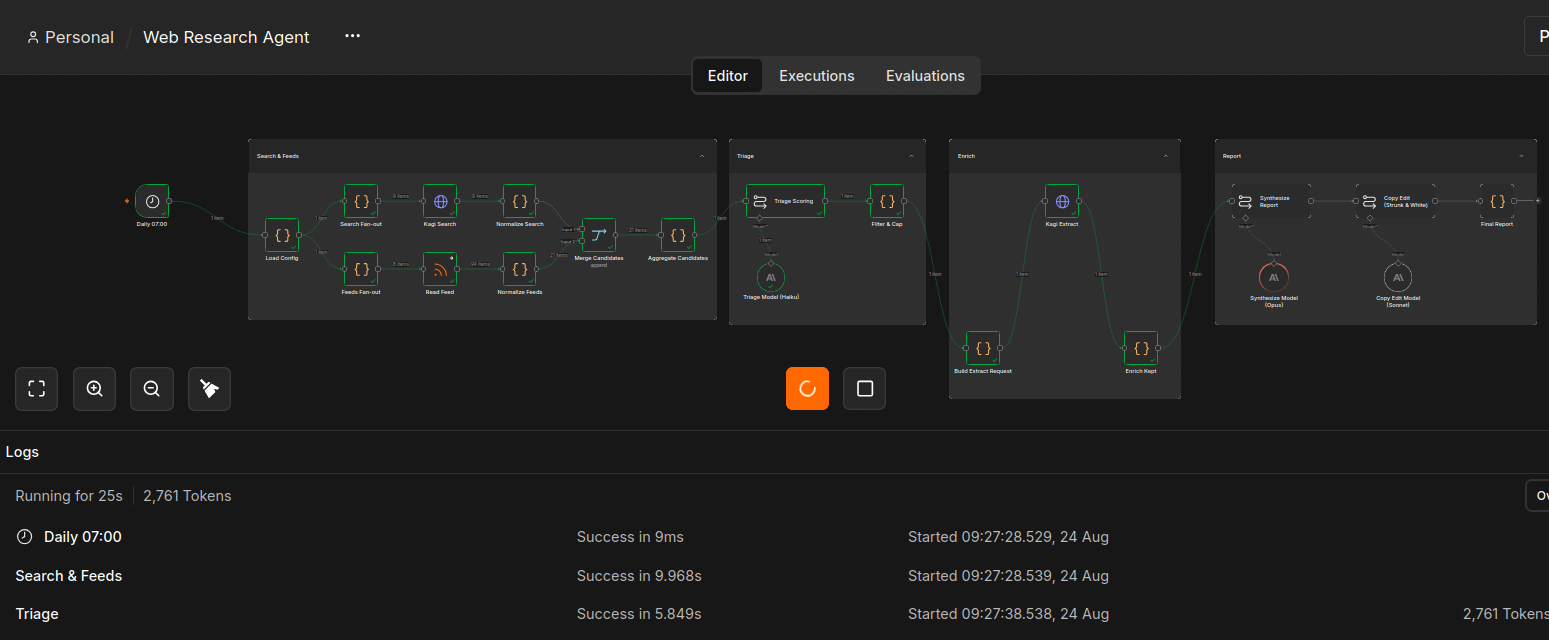
N8N is a visual workflow automation tool where you create flowchart diagrams to build automations. It is enormously popular for building AI Agents. This is not an N8N tutorial. There are plenty of those out there. What I wanted to share are my observations after rebuilding the sample application with N8N:
N8N’s user interface is thoughtful and well designed. Someone new to writing code will find it easier to understand than a wall of AI-generated code.
Data is presented clearly. You can see exactly the information that is gathered and handed off in each step.
The tool is technical and not dumbed down. This is good. Tools that hide complexity blind the human. It’s an opportunity to learn, and N8N provides high-quality training material.
It’s not for software engineers. I didn’t enjoy it, because I’m used to building applications with code. I’ve been writing my own code for 20 years. I think a great deal about software architecture, and this doesn’t afford that opportunity. The architecture is set.
N8N is designed to support a single person in building workflow automations, particularly those using AI. And in this use case, where we want to create our own social feed, it is likely the best tool available for a maker. For some people this will be all they ever need.
The people that get the most out of our makerspace are there to develop skills and build collaboratively. Visualizations can help one person understand the software she created, but those visualizations can also help a community work cooperatively to create systems that serve a larger purpose. Working with other human beings is a difficult and messy business. But collaboration is the most important thing. Period. As we continue this series, we’ll look at other tools, including our tool, SpiffWorks, to build workflows collaboratively and solve problems for more than a single person.